Workbench: my Swiss Army knife for killing repetitive tasks
Alexandre Jeffroy
Software Engineer
If I had to keep only one of my internal tools, it would be Workbench. Not because it does anything spectacular, but because it embodies a belief I've held for a long time: the time we lose is never in the big tasks, it's in the small ones, the ones we redo ten times a day without thinking.
The starting point: invisible repetition
On most projects, a significant part of the day dissolves into tiny gestures: starting an environment, preparing a dataset, triggering a startup procedure, chaining two or three commands in the right order. Taken individually, these actions cost nothing. Added up over a week, across an entire team, they add up to hours, and above all to opportunities for error.
Workbench was born from this observation. The idea wasn't to automate one specific task, but to build a foundation capable of hosting all these micro-actions as we identify them.
An interface rather than a list of commands
The core reasoning echoes what I develop in my other articles: in many cases, a well-designed graphical interface is more effective than a command line. Not for comfort, but because it makes visible what, on the command line, stays implicit.
A clearly named button never picks the wrong environment. An action tucked into an interface isn't forgotten like a command buried in a terminal history. A colleague joining the project doesn't have to memorize any syntax: they read, they click, they understand.
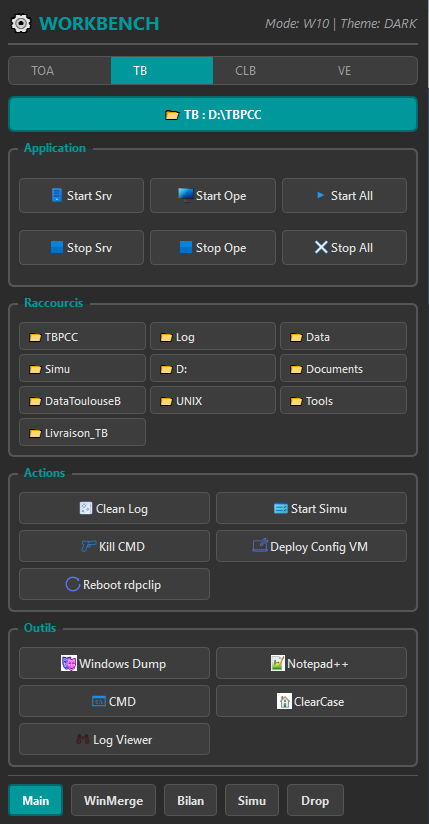
A foundation, not an end in itself
What makes Workbench valuable is that it's never "finished". Every time a new repetitive task emerges, it gets added to it. The tool grows with the project and with the team's needs.
This dimension is what makes it the base of my entire tooling approach. Rather than creating an isolated little script for each need, quickly written, quickly forgotten and hard to share, Workbench offers a single, coherent entry point. You know where to look, you know where to add.
The real gain: less mental load
Beyond the minutes saved, the clearest benefit lies elsewhere. When a tedious action becomes a simple button, it stops occupying the mind. You no longer wonder "what was that command again?" or "did I run it in the right order?". The tool remembers for you.
That's the whole point of internal tooling: it isn't only about saving time, but about freeing up attention to devote it to the problems that truly deserve it.
In short
Workbench isn't a technical feat. It's a pragmatic answer to a universal problem: repetition. By gathering everyday actions into a clear interface, it turns a handful of tedious commands into simple, safe, shareable gestures. And it's precisely because it stays modest and extensible that it has become, project after project, the tool I can no longer do without.
Other articles
SonarQube: Mastering Quality and Technical Debt
In sectors where reliability isn't negotiable, how do you make sure hundreds of thousands of lines of code meet the highest standards? SonarQube has become an essential ally on my projects.
GUIs vs. the Command Line: a Case for Pragmatism
The command line is often worshipped. Yet in some critical contexts, a well-designed graphical interface drastically reduces errors. Why PyQt is my go-to tool for building these interfaces.